
IncoinPay
Your complete, trusted guide to using the IncoinPay P2P trading platform. Learn step-by-step how to register, install the app, complete orders securely, and build daily referral income.
✨ Register on IncoinPay ⬇️ Download IncoinPay App (APK)If you are searching for IncoinPay, Incoin Pay, or the official IncoinPay App, you are in the right place. IncoinPay is an emerging Peer-to-Peer (P2P) platform designed to let verified buyers and sellers trade digital assets using Indian Rupees (INR) with direct bank settlement.
Our mission with this guide is to break down complex trading processes into plain, simple English so that any beginner can navigate the platform safely without falling for scams or losing funds.
📖 What is IncoinPay?
IncoinPay, also widely known as Incoin Pay, is a specialized Peer-to-Peer (P2P) platform that directly connects buyers and sellers of digital assets. Unlike traditional centralized exchanges where your money is held in custody by an intermediary, IncoinPay allows users to deal directly with one another.
When you want to buy tokens, you pay the seller directly through their specified payment option (such as UPI or IMPS bank transfer). Once the seller confirms receiving the exact payment in their bank account, the digital tokens are released to your wallet. Similarly, sellers can easily liquidate their tokens and receive cash directly in their bank account within minutes.
🚀 Key Features of IncoinPay Platform
IncoinPay is built to make P2P transactions fast, accessible, and rewarding for everyday traders. Here are the core highlights of the platform:
Funds go straight from the buyer's bank account to the seller's bank account. Your fiat currency is never trapped inside the platform.
When a trade starts, the seller's digital assets are locked in a secure smart vault until real payment receipt is verified.
Seamlessly link and receive payments through PhonePe, Paytm, Mobikwik, Google Pay, and direct IMPS transfers.
Deposit cryptocurrency using TRC20 or BEP20 networks at a transparent fixed exchange rate of 1 USDT = 108 INR.
Build an active trading team using your referral code and earn ongoing commission on every trade your downline completes.
🔄 How IncoinPay P2P Escrow Works
The escrow system is the safety bridge that prevents fraud between strangers. Here is the step-by-step transaction lifecycle of every trade on IncoinPay:
The buyer selects an order. IncoinPay instantly locks the seller's digital tokens into a secure escrow vault so the seller cannot run away with them.
The buyer opens their own banking or UPI app (PhonePe, Paytm, etc.) and transfers the exact money to the seller's displayed bank details.
The seller opens their own banking application to ensure the money has legitimately settled in their account balance.
Once the seller confirms receipt, the escrow vault instantly unlocks and transfers the InCoins directly into the buyer's wallet.
📝 How to Register on IncoinPay
Creating an account takes less than two minutes. Follow these simple steps based on the official sign-up screen:
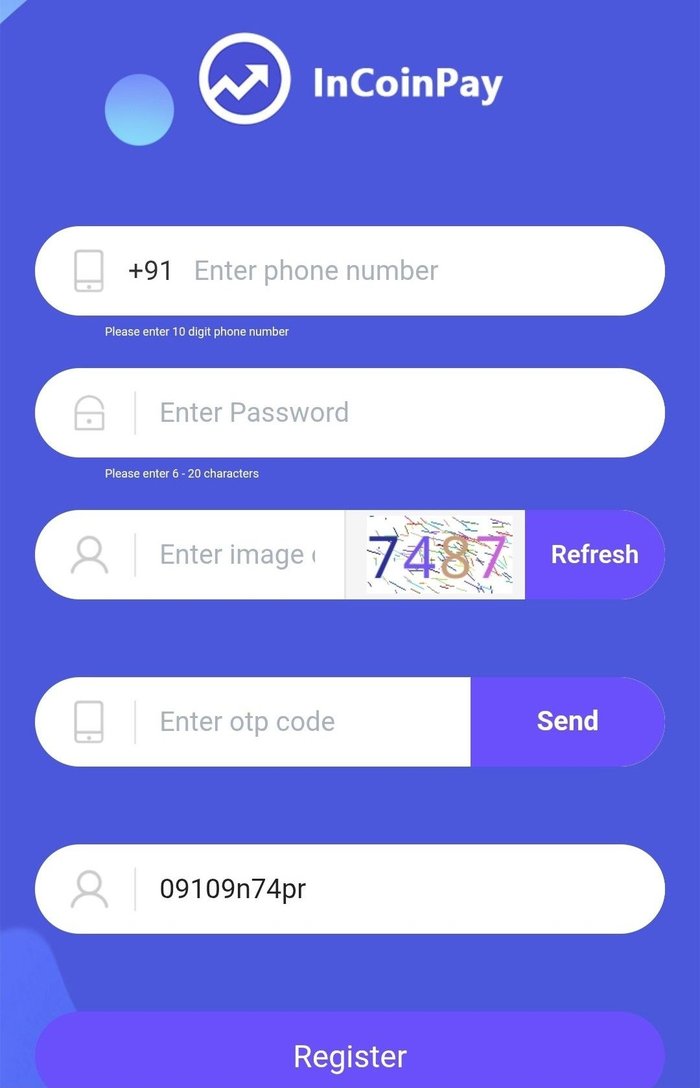
- Enter Phone Number: In the first box with the phone icon, the Indian country code +91 is selected by default. Type your active 10-digit mobile number.
- Create Password: In the second box, enter a strong password between 6 to 20 characters. Avoid easily guessable passwords.
- Image Verification (Captcha): Look at the captcha numbers shown in the third box (e.g. "7487"). Type those exact numbers into the box. If blurry, tap Refresh for a new image.
- Request OTP Code: Tap the purple Send button in the fourth box. Check your SMS inbox and type the verification code into the "Enter otp code" box.
- Confirm Invite Code: In the fifth box, ensure the active referral code 10083yrkab is entered. This guarantees your new user team benefits and rebate eligibility.
- Complete Registration: Tap the solid purple Register button at the bottom. Your account is now active and ready!
🔐 How to Login to IncoinPay
Once registered, logging into your account is fast and secure:
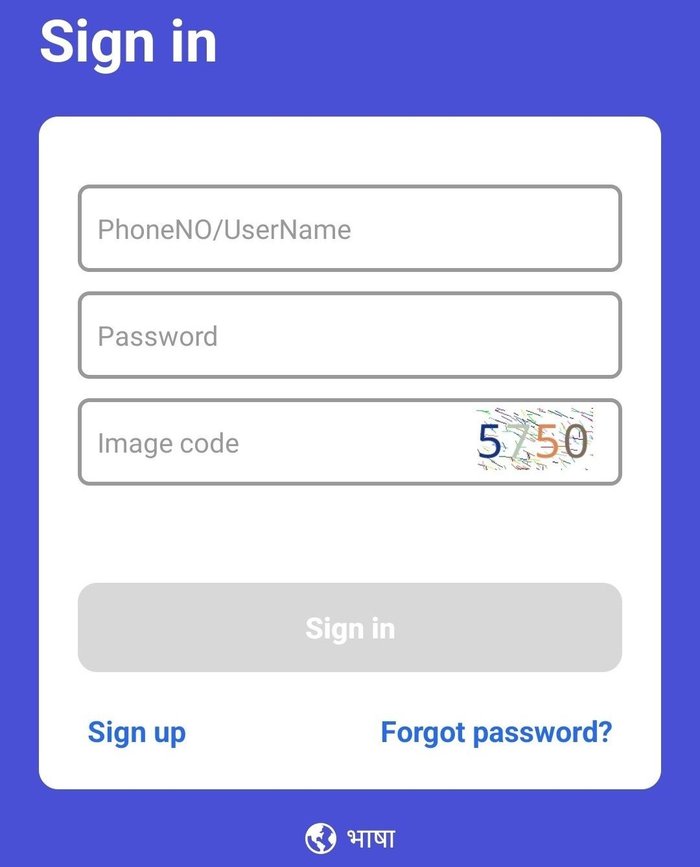
Existing Account Sign-in
- Enter Phone / Username: Type the registered 10-digit mobile number in the first input box.
- Enter Password: Enter your secret password carefully without typos.
- Image Verification: Type the numbers displayed in the captcha image on the right.
- Tap Sign In: Tap the active Sign in button to enter your personal account.
Password Recovery
If you ever forget your password, tap the blue Forgot password? link at the bottom right. Enter your registered phone number, request an SMS OTP, and set a new password easily.
👤 Profile Dashboard Overview
After logging in, tap the person icon labeled "Mine" at the bottom right of the navigation bar to access your personal dashboard.
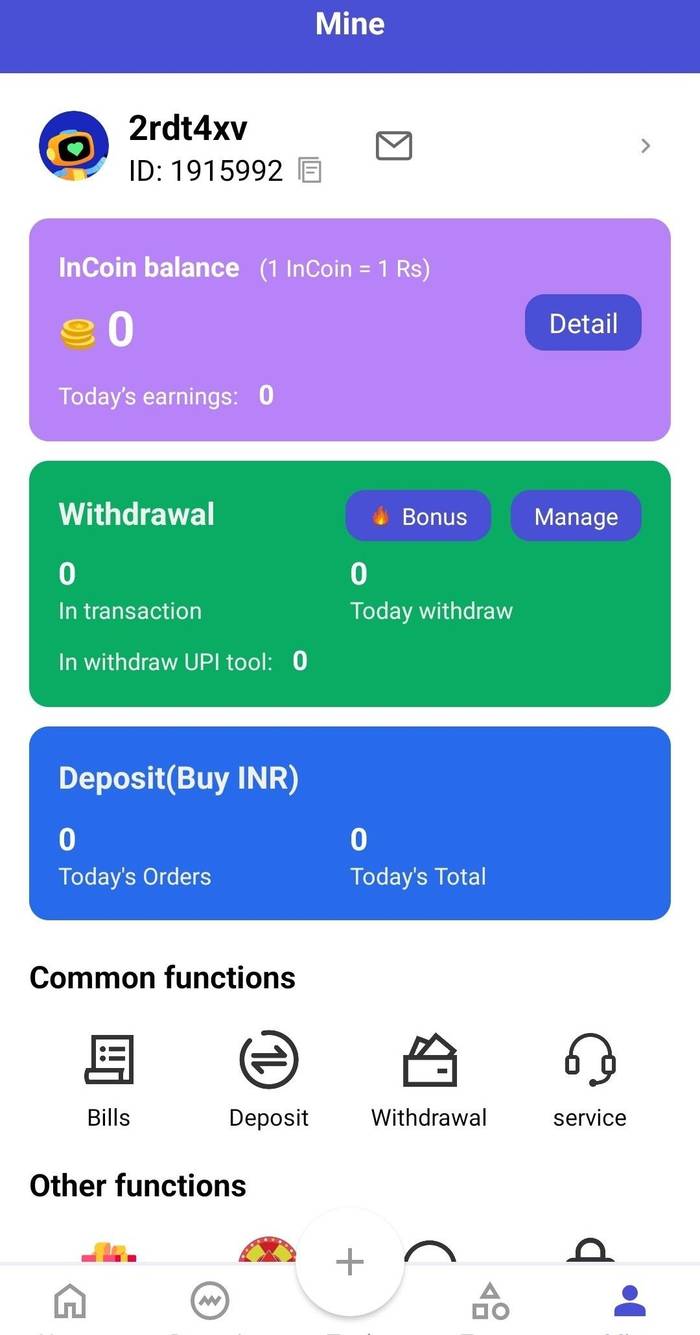
- User ID: Your unique account ID (e.g. 1915992) is displayed at the top with a convenient copy button for customer support references.
- InCoin Balance: Shows your available balance. Remember, 1 InCoin = ₹1 INR. It also displays today's earnings and transaction history.
- Withdrawal Section: Tracks funds currently in transaction or already settled into your bank account today.
- Deposit / Buy INR: Displays current active buy/sell orders and daily transaction volume.
- Quick Action Icons: Fast shortcuts to Bills, Deposit, Withdrawal, and Service (live chat support).
💳 How to Setup Payment Tools (Wallets)
Before placing sell orders or withdrawing funds to your bank, you must bind your personal payment method inside the Wallet section.
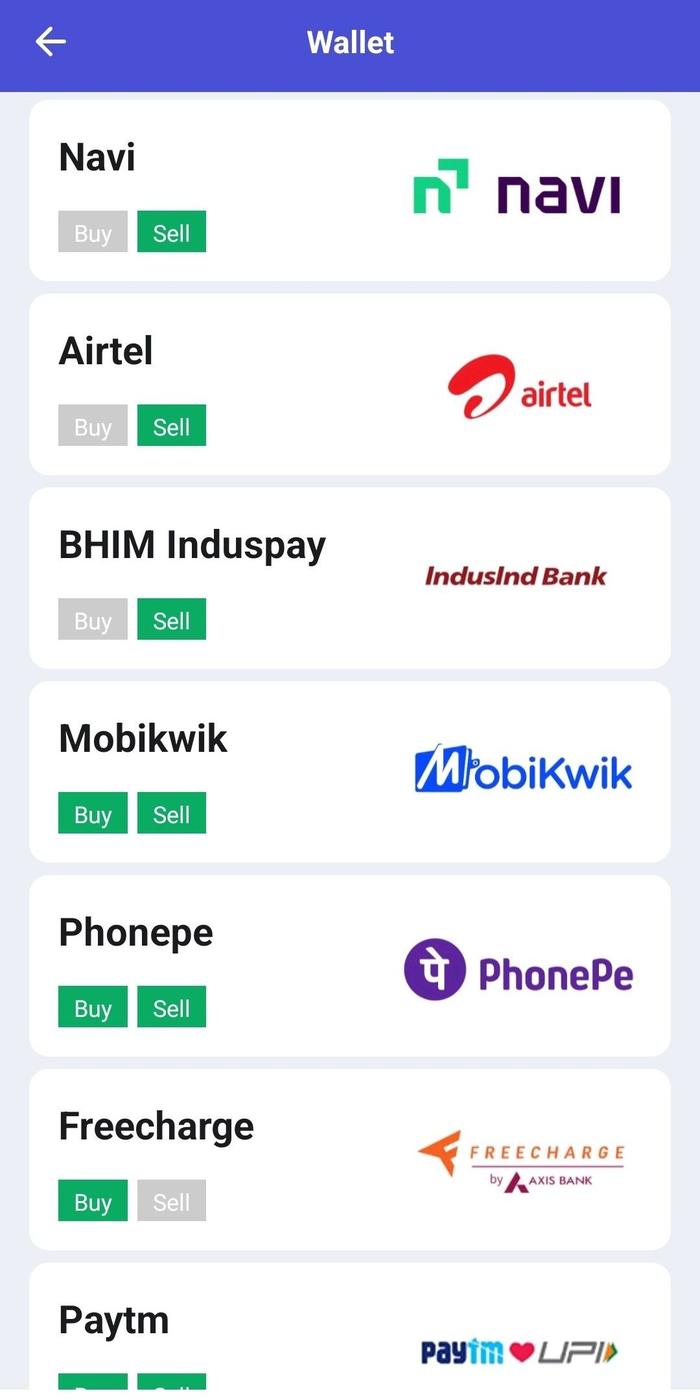
Different wallets support specific trading directions. Here is the full breakdown of supported payment channels:
| Payment Tool | Supported Actions |
| PhonePe | Buy & Sell |
| Paytm | Buy & Sell |
| Mobikwik | Buy & Sell |
| AmazonPay | Buy Only |
| Freecharge | Buy Only |
| Moneyview / Navi | Sell Only |
| Airtel Payments | Sell Only |
| BHIM Induspay | Sell Only |
| Business UPI (PhonePe/Paytm) | Sell Only |
How to Bind Your Wallet:
- Tap the "+" (Plus) sign at the bottom of the Wallet screen.
- Select "Add Tool" and pick your preferred payment gateway.
- Enter your exact UPI ID or bank account details registered under your own name.
- Save the tool. Once active, a green verified badge will appear next to the wallet.
💰 How to Earn from IncoinPay
Users can earn profits by fulfilling buy orders or depositing cryptocurrency through the deposit hub:
1. Earning via INR Orders
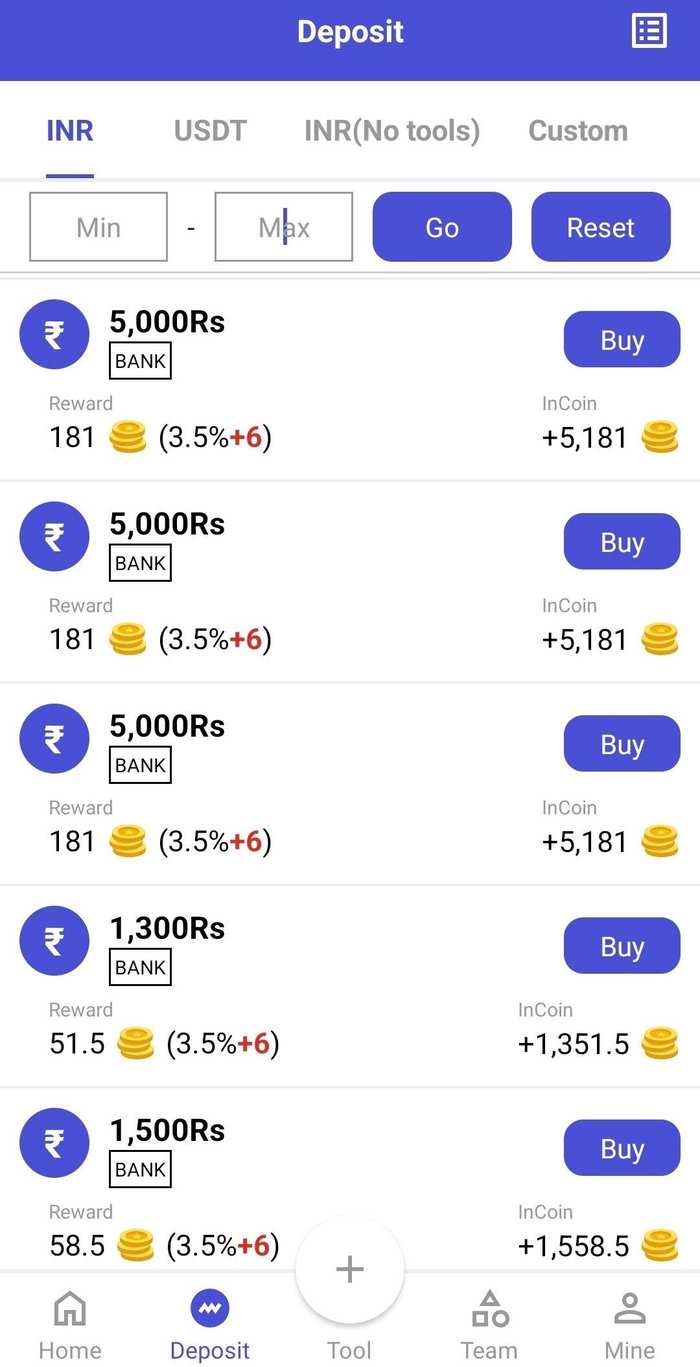
In the Deposit > INR tab, browse available orders. Fulfilling an order earns an attractive bonus on top of your capital. For instance, processing a 5,000 INR order can grant a bonus reward of 181 InCoin, crediting 5,181 InCoins into your balance!
2. Depositing USDT Crypto
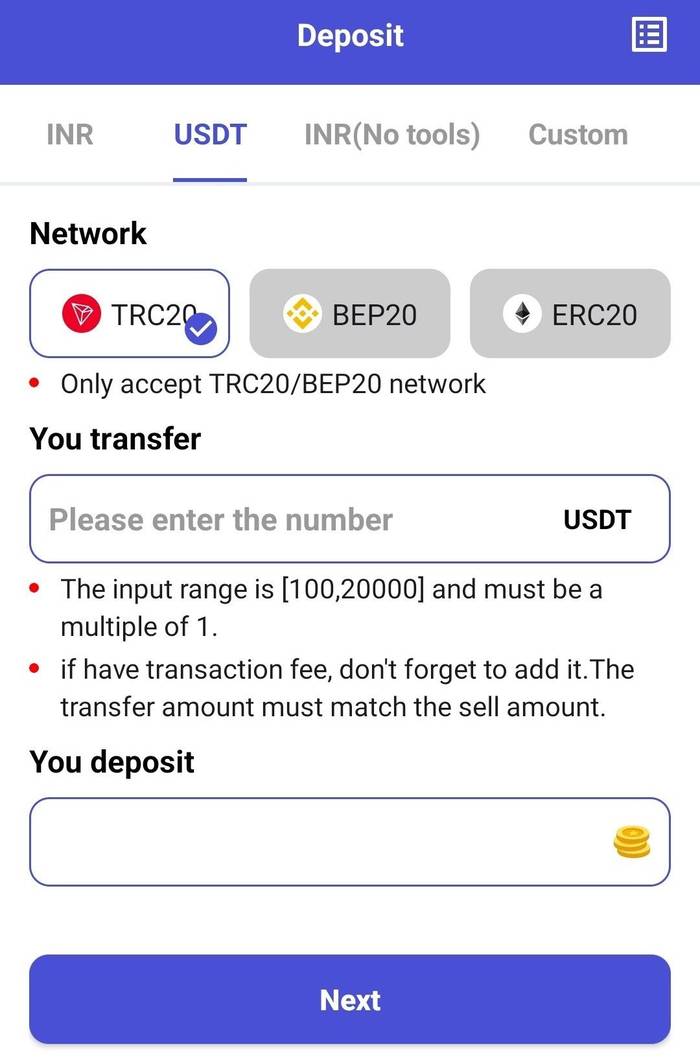
If you hold cryptocurrency, switch to the USDT tab. IncoinPay offers a guaranteed conversion rate of 1 USDT = 108 INR.
- Supported Networks: Transfer only via TRC20 or BEP20. Never send via ERC20.
- Transfer Limits: Amounts must be whole numbers between 100 and 20,000 USDT.
- Network Fees: Ensure your exchange fee is added on top so the exact receiving amount reaches the designated address.
👥 Team & Referral Commissions
Building a team is the most effective way to earn daily passive income on IncoinPay. Every time your referred members trade, you earn an automated rebate.
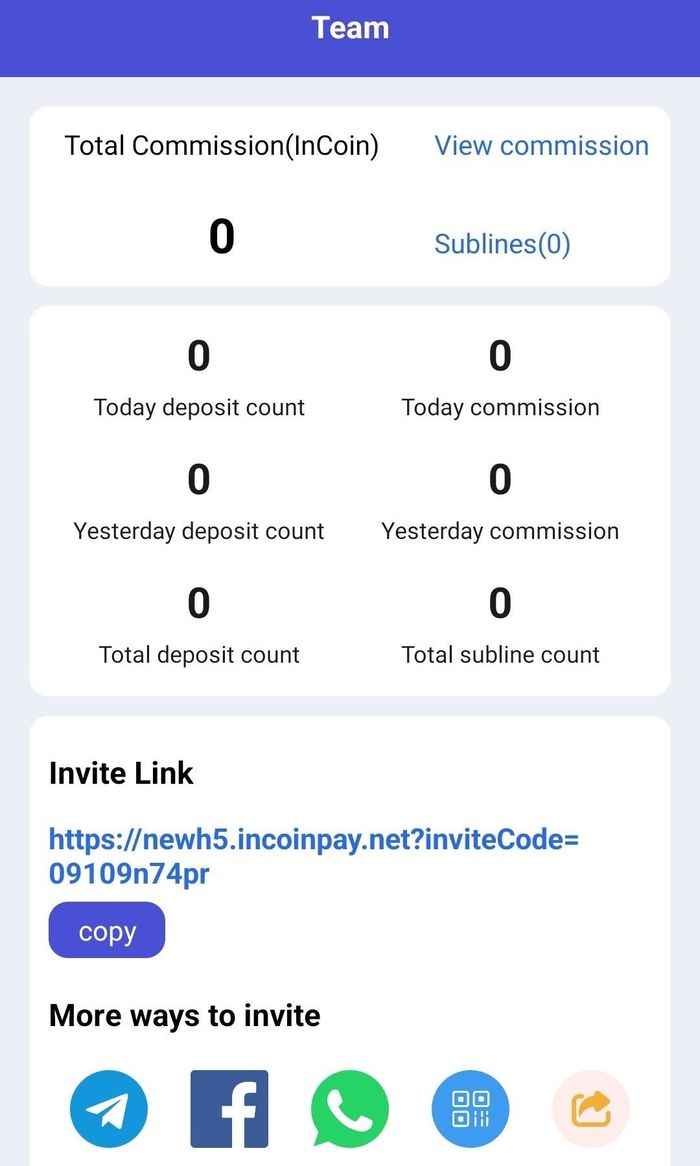
Inside the Team tab, you can track your total earnings, today's commissions, and the total number of members in your downline.
Two-Tier Rebate Structure
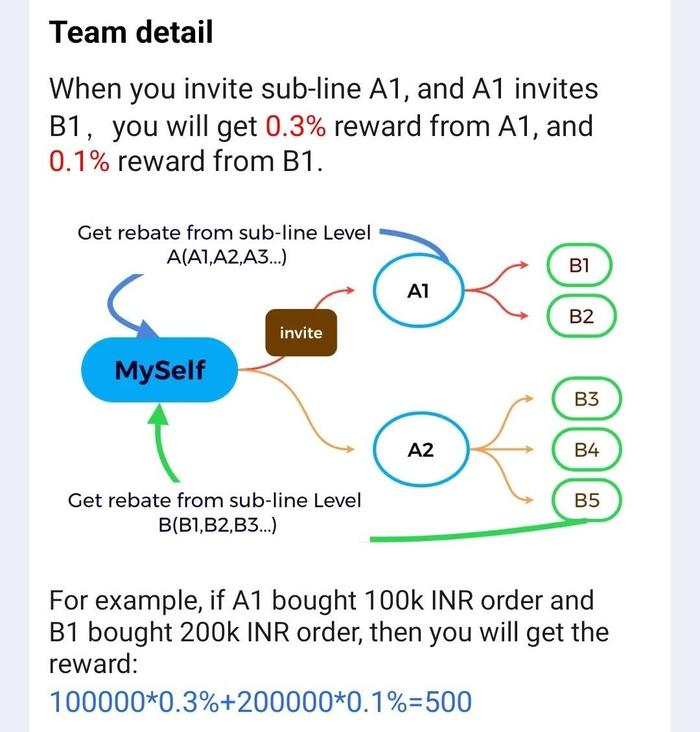
- Level A (Direct Invites): When a user registers directly with your code 10083yrkab, you receive a 0.3% rebate on their completed trade volume.
- Level B (Sub-Invites): When your Level A user invites someone else, you still earn a 0.1% passive reward on all their trades!
(1,00,000 × 0.3%) + (2,00,000 × 0.1%) = ₹500 Bonus deposited straight into your balance without any trading risk!
📋 Trading Rules & Safety Checklist
To keep your bank accounts safe and ensure every trade executes without friction, follow these golden rules:
Never rely on SMS notifications or payment screenshots sent in chat. Log into your actual banking application and verify the new balance before releasing any digital tokens.
Only send and accept payments from bank accounts matching the verified name on IncoinPay. Third-party payments carry cyber-complaint risks that can freeze your account.
If you have already sent money from your UPI or bank, never tap 'Cancel'. Tap 'Paid' and upload your payment transaction reference (UTR) to protect your funds.
If another user asks you to take the deal outside to WhatsApp or Telegram, decline immediately. Escrow protection only shields trades kept inside the app.
🛡️ Security & Scam Prevention
Because P2P trading involves direct peer transfers, you must guard yourself against common online deceptive practices:
Scammers frequently forge Photoshop-edited UPI slips. Always check your actual passbook in your bank app before releasing assets.
Scammers create fake Telegram profiles claiming to be official staff. Real staff will never message you first or ask for your password.
Reject transfers made from accounts with a different name than the buyer's profile to prevent cyber dispute account freezes.
Never release tokens before funds arrive, and never agree to offline deals where escrow cannot protect your investment.
⚙️ IncoinPay Technical Information
Check the technical specifications and system requirements for the application:
| App Name | IncoinPay (Incoin Pay) |
| App Category | Finance / P2P Digital Asset Exchange |
| Package Format | Android APK (Universal Release) |
| File Size | Lightweight (Approx. 20 - 30 MB) |
| Operating System | Android 7.0 (Nougat) or Higher |
| Network Supported | TRC20 & BEP20 (USDT), UPI, IMPS, NEFT |
| Fixed Exchange Rate | 1 InCoin = ₹1 INR | 1 USDT = ₹108 |
| License | Free to Download & Use |
📲 How to Download & Install IncoinPay APK
Make sure you have already registered your account using your phone number and referral code 10083yrkab. Then follow these steps:
- Tap the Download IncoinPay App (APK) button at the top of this page.
- Confirm the download when prompted by your browser.
- Go to your phone's Settings > Security > Install Unknown Apps and enable permission for your browser.
- Open your Downloads folder and tap on the downloaded IncoinPay APK file.
- Select Install and wait for completion.
- Open the application, sign in with your phone number and password, and start trading!
🎧 24/7 Live Customer Support
If you experience an order dispute, delayed transfer, or need account assistance, customer support is directly built into the app:
- Open the IncoinPay app and tap the "Mine" profile icon.
- Scroll down and tap the "Service" button (headphone icon).
- Select from the official Telegram or WhatsApp live support channels.
- Chat directly with an official agent to resolve your issue quickly.
⚠️ Troubleshooting & Quick Solutions
Here are quick fixes for common issues encountered by new users:
Ensure you entered a valid 10-digit Indian number without typing '+91' manually. Wait 60 seconds before tapping refresh, or check your SMS spam folder.
Do not tap 'Confirm Release'. Wait 10-15 minutes for bank network clearing. If funds still don't arrive, tap Appeal to involve support.
Because the app is distributed directly as an APK outside Google Play, tap "More details" and then "Install anyway" to proceed safely.
⚖️ Pros & Cons of IncoinPay
An honest, unbiased assessment of the platform's strengths and limitations:
✓ Advantages (Pros)
- Direct Personal Settlement: Withdrawn money settles straight into your UPI ID or personal bank account.
- Guaranteed Value: 1:1 InCoin to INR ratio eliminates asset volatility while trading.
- High-Speed Crypto Conversion: Fast USDT deposits via TRC20 credited within 3-5 minutes.
- Dual-Tier Team Passive Income: Earn continuous rebates from friends and their invitees.
✗ Limitations (Cons)
- External APK Installation: Not listed on Google Play Store; requires manual APK installation.
- Android Only: No native iOS app available for Apple iPhone users.
- Strict Anti-Duplicate System: Attempting to create multiple accounts on one phone leads to a permanent ban.
❓ Frequently Asked Questions (FAQ)
IncoinPay (frequently searched as Incoin Pay) is a simple and secure Peer-to-Peer (P2P) trading application. It allows you to buy and sell digital assets directly with other verified users with direct bank transfers.
IncoinPay is a 100% functional and real P2P trading platform. When you process a sell order, payment is transferred directly into your personal bank account by the buyer, meaning your money is never stuck in the system.
The official and active IncoinPay invite code is 10083yrkab. Entering this code during registration connects you to an active trading team, activates new-user bonuses, and unlocks multi-tier referral commission rewards.
To safely complete an Incoin Pay apk download, always use the official download button at the top of this page. This ensures you receive the verified, latest, and secure APK release.
IncoinPay supports popular Indian payment options including UPI (PhonePe, Google Pay, Paytm, BHIM) and direct IMPS bank transfers. For cryptocurrency deposits, USDT on the TRC20 network is accepted with an instant conversion rate of 1 USDT = 108 INR.
Minimum limits depend on the transaction channel. INR orders typically have flexible starting amounts (around 100 INR to 500 INR), while USDT crypto deposits require a minimum of 10 USDT (TRC20). Always verify the current minimum limit shown on the Deposit or Withdrawal screen inside the app before transferring funds.
Always wait until you personally check your bank or UPI app and confirm the money has actually arrived in your account. Never release your digital assets solely based on a payment screenshot or SMS. If the buyer does not pay within the timer, you can appeal the order and contact IncoinPay customer chat for assistance.
IncoinPay offers a multi-tier team commission structure: you earn a 0.3% to 2% rebate on Level 1 direct invites, and a 0.1% to 1% rebate on Level 2 secondary invites whenever your referred team members buy or sell orders.
Currently, the native app is available as an Android APK. iPhone users can access the platform via their mobile browser using the official web portal link (H5 version) without needing to download an Android APK.
For security and performance reasons, we do not recommend using older APK versions. The latest version contains the best payment tools and anti-fraud protections, so please stick to the newest update provided here.
There is no direct public phone number. Instead, open the app, tap the "Mine" profile icon, and select the "Service" headphone button for instant Telegram or WhatsApp live support.
Yes, while there are other P2P platforms like DiwaPay and JPGPay, IncoinPay stands out due to its 1:1 InCoin-to-INR ratio, high team referral bonuses, and fast USDT deposits.
Yes, downloading the IncoinPay APK from our official link is completely safe and free from malware. Enable 'Install from Unknown Sources' in your Android settings to complete installation.
No, IncoinPay does not charge any monthly account maintenance fees or hidden charges to register and trade.
About the Author: Manish
Hello! I am Manish, an independent digital asset trader and research enthusiast. When I first started P2P trading, I found it very confusing and scary due to scammers and technical jargon. I created this independent guide to help beginners navigate IncoinPay safely, avoid fraudulent payment slips, and trade with total confidence. Everything on this page is based on real experience. Stay safe and trade responsibly!